
After submitting your Indonesia e-Visa application through the official immigration portal, you can track its progress online at any time. The Directorate General of Immigration provides a real-time status tracker that shows whether your visa is still being processed, has been approved, or requires additional documents. This guide explains every step of the status check process, what each status means, and what to do if your application is delayed or rejected.
Where to Check Your Indonesia Visa Status
The only official place to check your Indonesia e-Visa application status is the Molina Immigration portal at molina.imigrasi.go.id. This is the same platform where you submitted your application. Third-party visa agents and intermediary websites may offer status checks, but they simply redirect you back to the official portal or display cached information that may not be current.
To access your status, you need the application number (also called the visa reference number) that was issued when you submitted your application. You should also have the email address you used during registration, as the portal may send verification codes to that inbox.
What if I lost my application number?
Check the confirmation email sent by the Directorate General of Immigration after your submission. The application number is in the subject line and body of that email. If you cannot find the email, contact the immigration helpdesk at +62 21 5224658 or visit the nearest immigration office with your passport.
Step-by-Step: How to Check Your Application Status
Follow these steps to check your Indonesia e-Visa status on the Molina portal:
- Go to molina.imigrasi.go.id in your browser
- Click “Check Status” or “Cek Status” on the homepage
- Enter your application number (format: e.g., V2026XXXXXXXXX)
- Enter the email address you used during your application
- Complete the CAPTCHA verification
- Click “Search” or “Cari”
The portal will display your current visa status along with any additional information or actions required.
Can I check the status without logging in?
Yes. The Molina portal allows you to check status without logging into your account. You only need the application number and email address. However, logging in gives you access to your full application history, uploaded documents, and the ability to respond to requests for additional information.
Indonesia Visa Status Meanings Explained
When you check your application, the portal displays one of several status codes. Each status indicates a different stage in the processing pipeline. Understanding these statuses helps you know what action, if any, you need to take.
| Status | Meaning | Action Required |
|---|---|---|
| Submitted | Application received, waiting for review | None – wait for processing |
| Under Review | Immigration officer is evaluating your documents | None – this is normal |
| Additional Documents Required | Officer needs more information or documents | Upload requested documents within 7 days |
| Approved | Visa has been granted | Download and print your e-Visa |
| Rejected | Application denied | Review reason, consider reapplying |
| Expired | Application window closed without completion | Submit a new application |
| Payment Pending | Fee has not been processed | Complete payment immediately |
If your status shows “Additional Documents Required,” log into your Molina account to see exactly which documents the officer needs. You typically have 7 days to respond before the application is automatically closed.
What does “Under Review” mean and how long does it take?
“Under Review” means an immigration officer has been assigned to your application and is checking your documents, background, and eligibility. For standard tourist and business e-Visas, this stage typically takes 3 to 5 business days. During peak travel seasons (June-August and December-January), processing can take up to 10 business days. The status does not change until the officer makes a decision.
How Long Does Indonesia e-Visa Processing Take?
Processing times depend on the visa category and the volume of applications the immigration office is handling. The following table shows typical processing times for the most common Indonesia e-Visa categories:
| Visa Type | Standard Processing | Express Processing |
|---|---|---|
| B1 – Visa on Arrival (e-VoA) | 1-3 business days | Not available |
| C1 – Single-Entry Tourist Visa | 3-5 business days | 1-2 business days |
| C2 – Single-Entry Business Visa | 5-7 business days | 2-3 business days |
| B211A – Social-Cultural Visa | 5-10 business days | 3-5 business days |
| D – Multiple-Entry Visa | 7-14 business days | Not available |
Express processing is available through select immigration offices and requires an additional fee. The standard timelines above assume all submitted documents are complete and accurate. Applications with missing or incorrect documents will take longer.
Why has my application been “Under Review” for more than 10 days?
Extended processing times can result from several factors: high application volumes during peak season, security checks triggered by your travel history or nationality, incomplete documentation that needs internal verification, or staffing shortages at the immigration office. If your application has been under review for more than 14 business days, contact the immigration helpdesk at +62 21 5224658 or email [email protected] with your application number.
Indonesia e-Visa Status Notifications
When your visa status changes, the Molina portal sends an email notification to the address you registered with. These notifications are triggered automatically for the following events:
- Application submitted – Confirmation with your application number
- Under review – Officer has been assigned
- Additional documents requested – Details of what is needed
- Visa approved – Link to download your e-Visa
- Visa rejected – Reason for rejection included
Email notifications may arrive with a delay of several hours. Always check the portal directly if you need real-time status. Some email providers (Gmail, Outlook) may filter immigration emails to spam or promotions folders, so check those folders if you are not receiving notifications.
I am not receiving status notification emails. What should I do?
First, check your spam, junk, and promotions folders. Add [email protected] to your email contacts or safe senders list. If you still do not receive emails, log into the Molina portal directly to check your status – the portal always shows the most current information regardless of email delivery issues. You can also update your email address in your Molina account settings if you suspect your registered email has delivery problems.
What to Do If Your Indonesia Visa Is Rejected
A visa rejection is not the end of the process. The Molina portal includes the rejection reason in your status details. Common rejection reasons and their solutions are listed below:
| Rejection Reason | What It Means | Solution |
|---|---|---|
| Incomplete documents | Missing required files | Reapply with all required documents |
| Invalid passport | Passport expired or damaged | Renew passport before reapplying |
| Photo does not meet requirements | Wrong size, background, or quality | Upload a new photo (white background, 35x45mm) |
| Insufficient funds proof | Bank statement not provided or outdated | Submit recent bank statement (last 3 months) |
| Previous immigration violation | Overstay or violation on record | Contact immigration to resolve the issue before reapplying |
| Purpose of visit unclear | Invitation letter or itinerary missing | Provide supporting documents explaining your trip |
You can submit a new application at any time after a rejection. There is no waiting period, but you must address the specific rejection reason in your new submission. The application fee is non-refundable, so you will need to pay again for a new application.
Can I appeal a visa rejection?
Indonesia does not have a formal appeal process for e-Visa rejections. Instead, you should submit a new, corrected application that addresses the specific reason for the previous rejection. If you believe the rejection was made in error, you can visit the nearest Indonesian embassy or consulate to discuss your case, or contact the Directorate General of Immigration at [email protected].
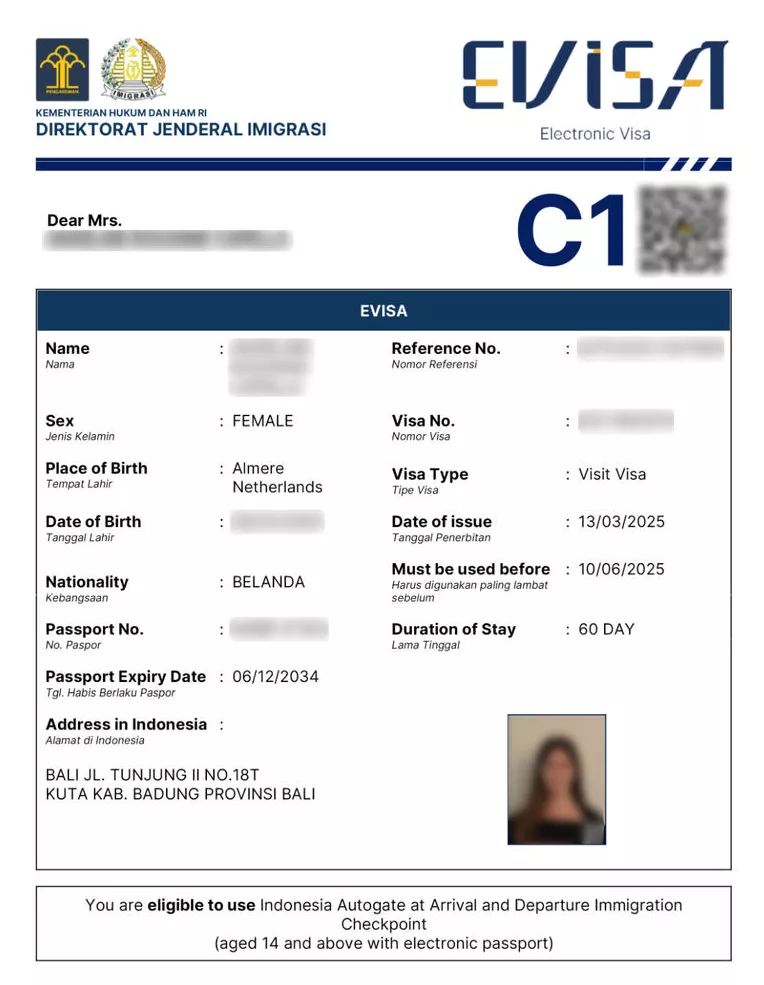
How to Download Your Approved Indonesia e-Visa
Once your status shows “Approved,” you can download your e-Visa directly from the Molina portal. Follow these steps:
- Log into your account at molina.imigrasi.go.id
- Go to “My Applications” or “Permohonan Saya”
- Find your approved application and click “View”
- Click “Download e-Visa” to get the PDF file
- Print at least two copies of the e-Visa document
You must present the printed e-Visa at the immigration counter when you arrive in Indonesia. Digital copies on your phone are accepted as a backup but are not a substitute for a printed document. Immigration officers at Indonesian airports will verify your e-Visa against their system using the barcode on the document.
How long is my approved e-Visa valid for entry?
Your approved e-Visa has an issuance date and a valid until date printed on the document. For most tourist and business visas, you must enter Indonesia within 90 days of the issuance date. The e-Visa is a single-entry document (unless you applied for a multiple-entry visa), meaning it becomes void once you use it to enter Indonesia, regardless of the remaining validity period.
Checking Status for Visa on Arrival (VoA) Applications
If you applied for an e-Visa on Arrival (e-VoA) through the Molina portal, the status check process is the same as for regular e-Visas. However, e-VoA applications are processed faster, usually within 24 to 72 hours. The e-VoA is available to citizens of over 90 countries and allows a 30-day stay that can be extended once for an additional 30 days.
If your e-VoA status shows “Approved,” download and print the confirmation. Present it at the dedicated e-VoA counter at your arrival airport in Indonesia to receive your entry stamp.
Can I check my VoA status if I bought it at the airport?
Visa on Arrival purchased at the airport counter does not have an online status check. You receive the visa stamp immediately upon payment at the immigration counter. The online status check only applies to e-Visa and e-VoA applications submitted through the Molina portal before your trip.
Tips for a Smooth Indonesia Visa Application
To avoid delays and rejections in your Indonesia visa application, keep these best practices in mind:
- Apply early – Submit your application at least 2 weeks before your intended travel date
- Check document requirements – Review the specific requirements for your nationality and visa type before applying
- Use a valid passport – Ensure your passport has at least 6 months of validity remaining from your date of entry
- Provide clear scans – Upload high-quality, legible scans of all documents
- Keep your application number – Save the confirmation email and note down your application number
- Monitor your email – Check for immigration notifications regularly, including spam folders
- Respond quickly – If additional documents are requested, upload them within the 7-day deadline
Following these steps will minimize the chance of processing delays and give you the best chance of approval on your first application.